
In simple words, TradeDoctor AI works like a smart trading performance workspace. You bring in your trades, add your notes and screenshots, review your trading day, and let the AI assistant help you understand what happened. The goal is not to give trading signals. The goal is to help you become a more disciplined, self-aware, and consistent trader.
What Makes TradeDoctor AI Different?
Many trading journals only focus on numbers like profit, loss, win rate, and account balance. Those numbers are important, but they do not always explain why a trader is improving or struggling.
TradeDoctor AI connects the full trading process:
- Your trading plan before the session
- Your imported or manually logged trades
- Your screenshots and trade notes
- Your emotions, focus, and readiness
- Your mistakes and rule breaks
- Your risk, discipline, and performance trends
- Your AI trade reviews and reports
This gives traders a clearer picture of their habits. Instead of asking, “Did I make money today?” TradeDoctor AI helps you ask better questions like, “Did I follow my plan?” “Did I break risk rules?” “Did I overtrade?” “Am I repeating the same mistake?”
Step 1: Start With Your Trading Account or Project
The first step inside TradeDoctor AI is setting up your trading workspace. You can organize your trading by account, project, market, or strategy. This is useful because many traders do not trade only one thing. Some trade forex, futures, crypto, stocks, or prop firm accounts.
By keeping each account organized, TradeDoctor AI can give cleaner analytics and better reviews. For example, your prop firm challenge may need different risk tracking than your personal trading account. Your forex trades may also behave differently from your crypto trades.
Why account organization matters
If all trades are mixed together, your data can become confusing. TradeDoctor AI helps keep records clean so you can review the right account, the right strategy, and the right trading behavior.
Step 2: Import or Log Your Trades
TradeDoctor AI gives traders different ways to add trades to the journal. This is important because not every trader journals the same way. Some traders want fast manual entry. Others prefer importing trades from broker reports or screenshots.
Manual Trade Logging
You can manually add a trade with key details such as instrument, entry, exit, result, notes, and trade status. This is useful when you want full control over your journal entry.
Manual logging is especially helpful for traders who want to record context, emotions, setup quality, and rule-following details. These details are often more useful than the trade result alone.
Broker Import
TradeDoctor AI also supports broker import workflows, which can help traders bring in trade history more quickly. This saves time and reduces the chance of missing trades.
Imported trades can then be reviewed, tagged, filtered, and analyzed inside the journal. This turns raw broker data into a more useful trading review system.
Snap Journal and Screenshot Import
Snap Journal is designed for traders who use just want to take the trading platform’s history screenshots and want someone to log these in their journal. So, in Snap Journal you will just need to provide the screenshot and AI will automatically extracts all the trades and log it into the TradeDoctor AI.
Step 3: Add Notes, Screenshots, Tags, and Trade Context
After trades are imported or logged, TradeDoctor AI helps you add context. This is where a normal trade record becomes a useful trading journal.
You can add notes about why you entered, what you expected, how you managed the trade, and whether you followed your plan. You can also attach screenshots and mistake tags.
Examples of useful trade notes
- “I entered before confirmation.”
- “The setup matched my plan, but I exited too early.”
- “I moved my stop because I did not want to take the loss.”
- “This was a clean trade, but the result was negative.”
- “I took this trade after two losses and felt emotional.”
These notes help TradeDoctor AI understand the behavior behind the trade. Over time, this gives you better feedback than a simple profit and loss report.
Step 4: Track Mistakes and Rule Breaks
One of the most important parts of TradeDoctor AI is mistake tracking. Many traders repeat the same problems for months without clearly seeing them. TradeDoctor AI helps make those problems visible.
You can track mistakes such as:
- Overtrading
- Revenge trading
- Entering without confirmation
- Breaking daily loss limits
- Using poor risk management
- Exiting too early
- Holding losers too long
- Trading during poor emotional state
- Ignoring the trading plan
This turns vague feelings into clear data. Instead of saying, “I need to be more disciplined,” you can see exactly where discipline is breaking down.
The real value of a trading journal is not only recording what happened. It is finding the repeated behavior that explains why it happened.
Step 5: Plan Your Trading Day Before Execution
TradeDoctor AI is not only for after-trade review. It also helps traders prepare before the trading session starts.
With planning tools like Text Journal and day readiness tracking, you can write your market view, define your focus, set rules, and check your mental state before taking trades.
What you can include in a daily trading plan
- Market bias
- Main instruments to watch
- Important news events
- Maximum risk for the day
- Maximum number of trades
- Emotional state
- Sleep and focus level
- Rules you must follow
This matters because many trading mistakes happen before the trade is even entered. If there is no plan, it becomes easier to justify random trades in the moment.
Step 6: Use TradeDoctor Pulse for AI Diagnosis
TradeDoctor Pulse is the in-app AI assistant inside TradeDoctor AI. It helps traders review their journal, trades, rules, risk, and performance patterns.
The AI diagnosis is not about predicting the market. It does not tell you when to buy, sell, long, short, enter, or exit. Instead, it helps you understand your own trading behavior based on your journal data.
What TradeDoctor Pulse can help with
- Reviewing completed trades
- Finding repeated mistakes
- Checking whether you followed your rules
- Summarizing your trading day
- Reviewing weekly or monthly performance
- Explaining discipline problems
- Pointing out risk management issues
- Helping you reflect on your trading process
For example, if your journal shows that you often lose after increasing trade size emotionally, TradeDoctor Pulse can help highlight that pattern. If you keep breaking rules after the first losing trade of the day, the AI can help you notice that too.
Step 7: Generate AI Trade Reviews
After a trade is closed, you can use AI trade reviews to get a structured breakdown. This helps you review the trade more objectively.
A good trade review may look at:
- Whether the trade followed the original plan
- Whether the risk was reasonable
- Whether the entry had enough confirmation
- Whether the exit was emotional or planned
- Whether the trade matched your strategy
- What mistake, if any, showed up
- What lesson should be carried into the next session
This makes review easier for traders who do not always know what to write after a trade. The AI gives structure, while the trader still remains responsible for decisions and self-review.
Step 8: Review Daily, Weekly, and Monthly Reports
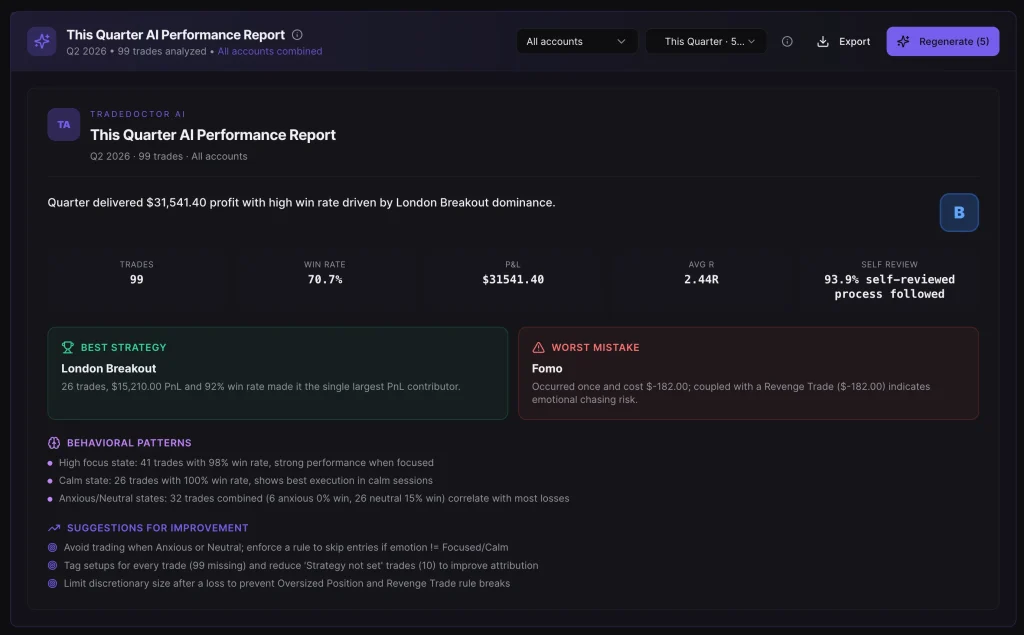
One trade does not tell the whole story. That is why TradeDoctor AI also supports bigger performance reviews. Weekly and monthly reports help traders zoom out and see long-term behavior.
Why bigger reviews are important
A trader can have one bad trade and still be following a good process. A trader can also have one profitable trade that was actually a bad decision. Bigger reports help separate short-term results from long-term patterns.
TradeDoctor AI reports can help you understand:
- Your most common trading mistakes
- Your strongest and weakest trading days
- Your risk and discipline trends
- Your trade review backlog
- Your performance by account or market
- Your emotional and behavioral patterns
Step 9: Use Dashboards and Analytics to See the Bigger Picture
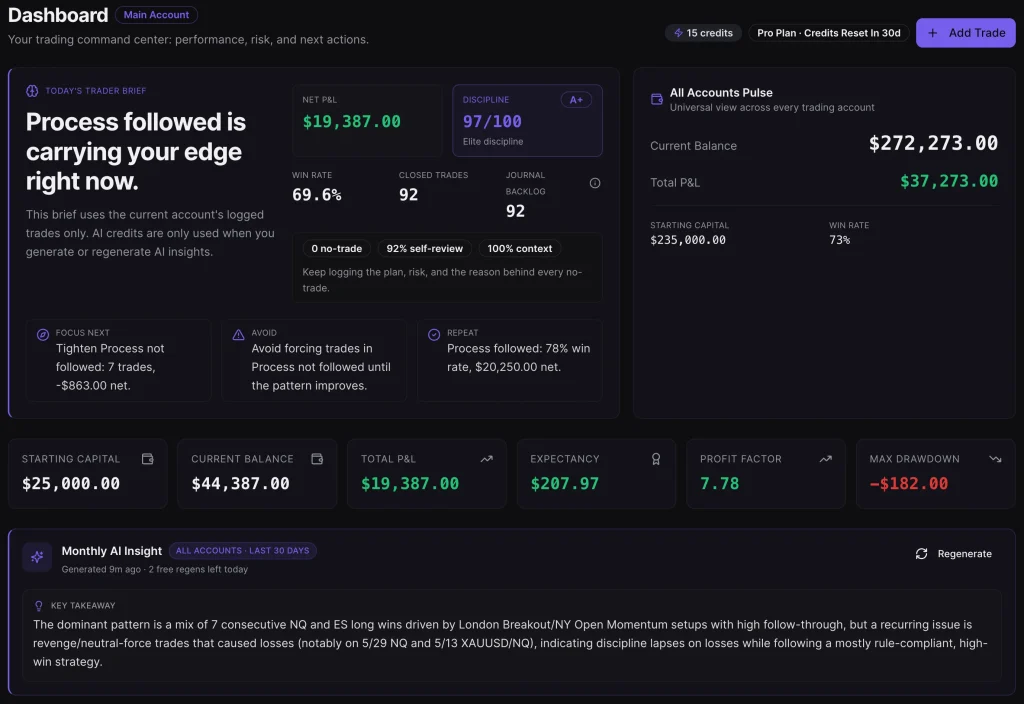
TradeDoctor AI includes dashboards and analytics so traders can review performance visually. This makes it easier to understand progress without digging through every single trade manually.
Analytics can help answer questions such as:
- Am I improving or getting worse?
- Which mistakes cost me the most?
- Which setups perform best?
- Which account needs more discipline?
- Am I trading too much?
- Do I follow rules better on certain days?
A dashboard is useful because traders need fast feedback. When your journal is visual and organized, it becomes easier to review it consistently.
Step 10: Turn Diagnosis Into Better Trading Habits
The final step is improvement. TradeDoctor AI is not only about collecting data. It is about helping traders take action based on that data.
Once the AI diagnosis shows repeated issues, you can create better rules for future sessions. For example:
- If revenge trading appears often, add a cooldown rule after losses.
- If overtrading is common, set a maximum number of trades per day.
- If entries are rushed, require confirmation before entering.
- If exits are emotional, write exit rules before the trade starts.
- If risk is inconsistent, reduce position size until discipline improves.
This is where the journal becomes powerful. The data shows the problem. The AI helps explain the pattern. The trader uses that insight to improve the next decision.
A Simple Example of How TradeDoctor AI Works
Imagine a trader imports 30 trades into TradeDoctor AI. At first, the trader only sees that the account is down for the month. But after adding notes, tags, and screenshots, a clearer pattern appears.
The AI diagnosis might show:
- Most losses happened after the first losing trade of the day.
- The trader increased risk after losses.
- Several trades were taken without confirmation.
- The best trades happened when a written plan existed.
- The worst trades happened during emotional sessions.
This is much more useful than simply knowing the monthly profit or loss. Now the trader knows what to work on: emotional control, risk consistency, and better pre-trade planning.
TradeDoctor AI Is for Review, Not Trading Signals
TradeDoctor AI is designed for journaling, analytics, and self-review. It does not provide financial advice or trading signals. It does not tell users what asset to buy or sell. It does not make trading decisions for users.
This is an important difference. The platform helps traders improve their process by reviewing completed trades, journal notes, plans, and risk behavior. The trader remains responsible for all trading decisions.
Why AI Diagnosis Matters for Traders
Trading is not only a technical skill. It is also a behavioral skill. Many traders know their strategy but still struggle because of fear, greed, impatience, poor risk control, or lack of consistency.
AI diagnosis helps by finding patterns that are easy to miss. A trader may not remember every emotional trade, but the journal does. A trader may not notice that most mistakes happen at a certain time of day, but the data can show it.
This kind of feedback can help traders stop guessing and start improving based on evidence.
Who Can Benefit From TradeDoctor AI?
TradeDoctor AI can be useful for many types of traders, including:
- Beginner traders who want to build good habits early
- Day traders who need fast logging and daily review
- Forex traders who want better trade organization
- Futures traders who need risk and discipline tracking
- Crypto traders who want clearer performance review
- Stock traders who want better journaling structure
- Prop firm traders who must follow strict rules
- Experienced traders who want deeper performance insights
Key Benefits of TradeDoctor AI
1. Faster Trade Journaling
Trade import, screenshot workflows, and manual logging make it easier to keep the journal updated.
2. Better Trading Discipline
Rule tracking, mistake tags, and readiness checks help traders stay accountable.
3. Clearer AI Feedback
TradeDoctor Pulse helps explain patterns in simple language so traders know what to review.
4. More Useful Performance Reviews
Dashboards, AI reports, and trade reviews help traders look beyond one trade and study long-term behavior.
5. Better Self-Awareness
By connecting trades with emotions, plans, mistakes, and results, TradeDoctor AI helps traders understand themselves better.
Final Thoughts: How TradeDoctor AI Works in One Sentence
TradeDoctor AI works by turning your trades, screenshots, notes, rules, emotions, and results into a structured trading journal, then using AI diagnosis to help you understand your behavior and improve your process.
It is not a magic trading system. It is not a signal provider. It is a practical AI trading journal for traders who want to stop repeating the same mistakes and start learning from real data.
If you want a better way to import trades, review your performance, track discipline, and understand what is really happening in your trading, TradeDoctor AI gives you a simple and powerful workflow from trade import to AI diagnosis.