Features · From check-up to recovery

Everything it takes to find the leak and fix it.

TradeDoctor AI works like a check-up for your trading. Capture the evidence (synced, imported, snapped or typed), get a diagnosis of the mistakes that keep costing you, follow one prescription at a time, and watch the habit recover. Here is every tool involved.

50 free trades15 AI credits/monthNo credit card
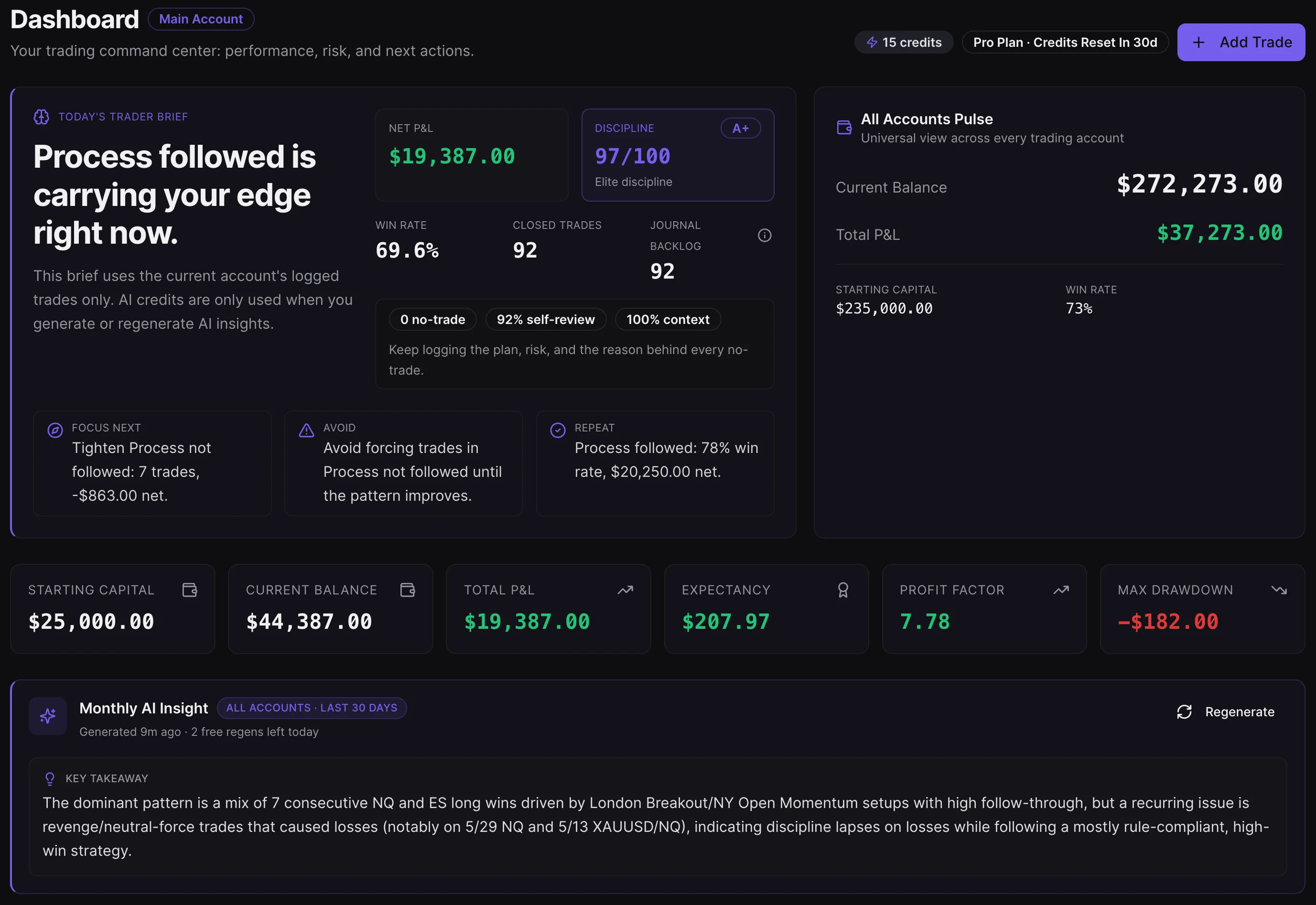
app.tradedoctorai.com/dashboard
TradeDoctor AI dashboard with trading analytics, journal review, and AI insights
AI trading journal softwareMT4/MT5 trading journaltrade review appscreenshot trading journaltrading analytics tooltrader psychology journal
Step 1 · Check-up: capture the evidence

A diagnosis is only as good as the evidence.

Four ways to get your trading into TradeDoctor, from zero-effort sync to a 10-second screenshot, plus a pre-session plan so the diagnosis can compare what you intended with what you did.

Pre-session check-up · Text Journal

Build a session plan before the first entry.

Confirm day rules and readiness, write your market read once, and use AI-assisted structure to turn the note into sessions, instruments, triggers, invalidation, and no-trade conditions for your own review.

  • Day rules, risk limits, and news caution stay attached to the plan.
  • Sleep, focus, and emotion become assistant context instead of ignored notes.
  • Missing setup details stay blank for the trader to review, not guessed by AI.
℞ Plan the trade before the market plans it for you.
The scan · Snap Journal

Paste or upload a screenshot and turn it into a structured trade log.

Snap Journal is built for traders who do not want to manually type every detail after a session. Paste or upload screenshots from trade history, order tickets, broker statements, or platform exports, then use TradeDoctor AI to extract the important fields into a cleaner journal entry.

It is especially useful when your broker export is messy, when you are reviewing from a phone, or when you want to capture chart context alongside the numbers.

  • Extracts trade details from screenshots into journal-ready fields.
  • Helps preserve visual context that CSV files often miss.
  • Skips deposits and withdrawals, unchecks duplicates, and lets you edit before saving.
  • Free users get Snap Journal; Pro unlocks screenshot journaling at scale.
Medical history · Broker import

Import broker files without rebuilding your journal from scratch.

Upload CSV, HTML, or XLSX statements and let TradeDoctor AI organize the raw data into a usable trading journal. Import is useful for backfilling old trades, reviewing a funded challenge, or starting with months of history already in place.

The Free plan supports broker import capped at 50 trades. Pro supports unlimited trades and unlimited trading accounts, so active traders can keep separate accounts, strategies, and markets organized.

  • MT4, MT5 and Binance files are recognized automatically; other brokers (including cTrader exports) go through smart column mapping.
  • Exact duplicates are skipped, so re-imports never double-count.
  • Useful for forex, metals, indices, crypto, CFDs, and prop firm traders.
  • Keeps historical trades searchable and reviewable instead of buried in files.
Auto-sync · MT4/MT5

Connect MetaTrader read-only and stop exporting statements.

Link an MT4 or MT5 account with the investor (read-only) password. Press Sync now and TradeDoctor pulls balance, equity and closed trades, including multi-day positions, into the journal account you choose. It can never place trades or move funds.

  • Up to 2 syncs per account every 24 hours. Not a live feed.
  • Works with personal, demo, prop challenge and funded accounts.
  • Add-on for Pro: $9.99/month per connected account.
How MT4/MT5 sync works
MT5 · Personal account

Account synced

Read-only
Balance$12,480
Equity$12,395
Closed trades imported54
Next sync availablein 5h 40m
Step 2 · Diagnosis: name the leak

Not just what happened. Why, and what it cost.

TradeDoctor reads your trades and the notes you write about them, groups the mistakes you keep repeating (even when you describe them differently), and prices each one. Then Pulse and AI Trade Review let you dig into any trade, day or pattern.

Recurring behavioral patterns
Your notes, clustered
"jumped in early" + "FOMO" + "didn't wait" = Entered too early

AI groups free-text notes from your closed trades into recurring mistakes and suggests a tag for each. One free scan every 5 hours.

Mistake cost
Every mistake, priced
Revenge trade · 4 trades · −$1,840 · −3.2R

Mistake Tag Analysis and the Leak Detector show which habit is the most expensive, so you fix that one first.

Record over checkbox
Honest rule tracking
"Followed plan" ✓ · max-trades rule ✗

When your own rules were broken, the AI says so, even on days you ticked "I followed my plan".

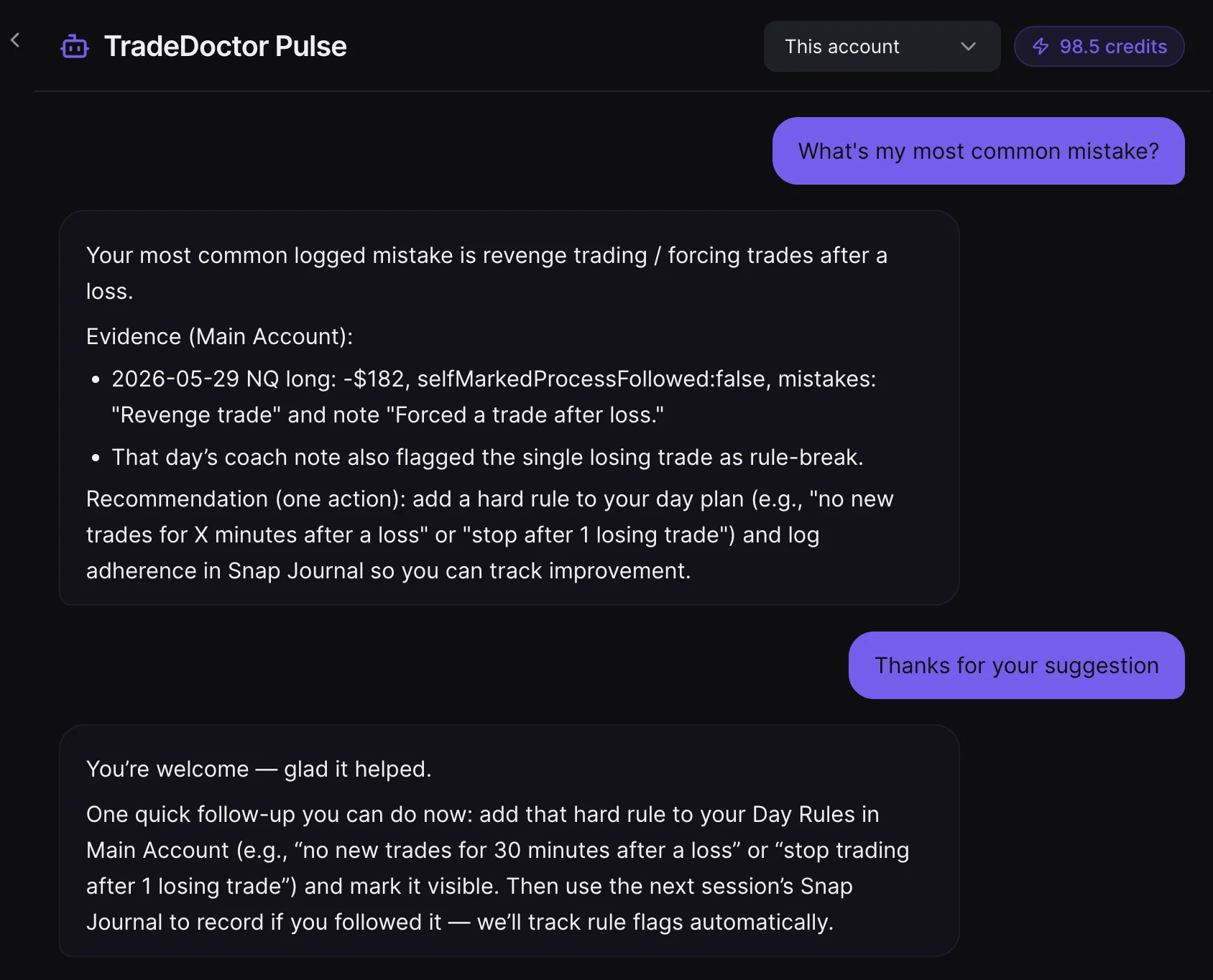
Ask the doctor · TradeDoctor Pulse

Ask questions about your own journal history, not generic trading theory.

Pulse, the AI journal assistant, helps you investigate your own data: best setups, weakest sessions, recurring mistakes, risk quality, emotional patterns, and what changed between winning and losing periods.

Instead of scrolling through charts and spreadsheets, you can ask focused questions like “Why am I losing in New York session?” or “Which strategy has the highest expectancy?” and use the answers to guide your next review.

  • Works from your logged trades, tags, notes, accounts, and analytics.
  • Helps convert raw performance into clear review prompts.
  • Pulse chat is available on every plan, including Free.
℞ Ask one honest question after every red day.

TradeDoctor Pulse
TradeDoctor Pulse AI journal assistant chat inside TradeDoctor AI
Case review · AI Trade Review

Review individual trades for execution notes, psychology, and rule discipline.

AI Trade Review helps you turn one trade into a structured note. It can summarize whether the trade followed your plan, where risk was placed, whether the exit matched your written thesis, and what behavior was recorded around the decision.

This is where your journal becomes more than a record. You get a clearer review note about what happened, what your data shows, and what deserves attention during your next review session.

  • Reviews entry, exit, risk, notes, tags, and screenshots.
  • Highlights rule breaks, emotional decisions, and repeatable strengths.
  • Treats missed and canceled trades as decisions, not breakeven results.
  • Gives one focused improvement without turning review into homework.
AI insight
TradeDoctor AI monthly insight report with AI performance review
Steps 3 & 4 · Prescription and recovery

Get one thing to fix. Watch it heal.

Graded reports turn the diagnosis into a short list of changes. Analytics, the calendar and the Discipline Score show whether those changes are working, week after week.

AN

Advanced analytics

Win rate, profit factor, expectancy, drawdown, R-multiples, plus results by session, weekday, time of day, instrument, strategy, setup and duration. Emotion vs performance and confidence calibration show the psychology behind the numbers.

BH

Strategy and mistake tags

Free includes 3 strategies and 5 mistake tags. Pro unlocks unlimited strategies and mistake tags so your journal can match the way you actually trade.

BreakoutFOMOLate entryA+ setup
Biggest leak: late entries after missed move.
DS

Rule flags and discipline score

Track whether you respected the plan, not only whether the trade made money. The Discipline Score grades plan adherence, risk coverage and journaling, and consistency badges never punish a day with no valid setup.

✓ Max 2 trades respected⚠ Risk/trade exceeded○ Canceled trade logged correctly
CA

Calendar and Day Insight

See green days, red days and quiet days at a glance. Day Insight explains what helped or hurt a specific day, including revenge sequences and morning vs afternoon differences.

RP

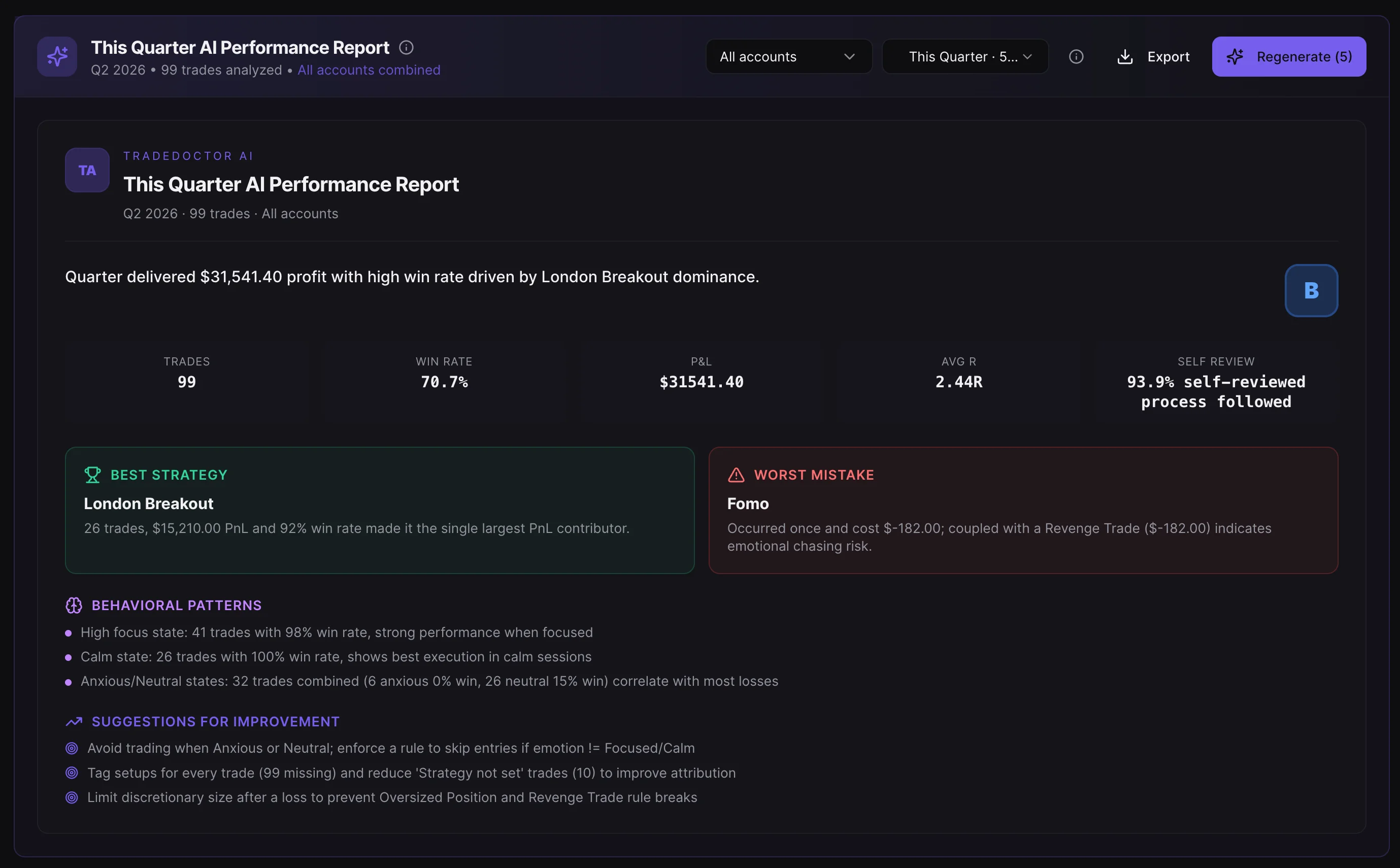
AI reports

Weekly, monthly, quarterly and yearly AI reports with a headline, best strategy, most expensive mistake, three behavior patterns, three improvements and a grade from A to F. A losing strategy is never dressed up as your edge.

Monthly AI Insight
TradeDoctor AI monthly AI performance report screenshot
Everyday essentials

Built for real trading routines, not only perfect spreadsheets.

Whether you trade one account or several, TradeDoctor AI keeps your journal organized enough to review quickly and detailed enough to review patterns.

TJ

Plan Analysis

Build the day around readiness, rules, sessions, and instrument ideas before a trade exists. History keeps the plan visible later.

NT

Missed and canceled trades

Skipped, missed, and canceled ideas are tracked as real trading decisions, not mislabeled breakeven trades.

AC

Trading accounts

Free supports 1 trading account. Pro and above support unlimited accounts for personal, challenge, funded, demo or strategy-specific journals, plus an All Accounts view.

UN

Unlimited trades on Pro

Free is built for getting started with 50 trades. Pro removes the trade cap for active traders who need a full historical performance record.

SR

Trade search

Pro includes trade search so you can quickly find symbols, setups, mistakes, notes, screenshots, accounts, and old review examples.

CS

Encrypted cloud storage

Your journal is stored in encrypted cloud storage and available on every device, so you can log on your phone and review at your desk.

CR

AI credits

Free includes 15 AI credits a month, Pro 60. Credit packs start at $5 and never expire. Failed AI requests are refunded automatically.

2F

2FA account protection

Two-factor authentication adds an extra layer of protection for traders who want stronger account security around their journal data.

Read security details ->
Feature comparison

Free gets you the check-up. Paid plans remove the limits.

Try the full diagnosis on Free. Upgrade to Pro for unlimited journaling and prop firm guardrails, and add read-only MT4/MT5 sync when you want your trades to arrive on their own.

FeatureFreePro
Price$0$9.99/mo
Trades50Unlimited
Trading accounts1Unlimited
Strategies and mistake tags3 / 5Unlimited
Broker file importCapped at 50 trades✓
MT4/MT5 read-only sync—Add-on, $9.99/mo per account
Snap Journal & Text Journal✓✓
Pulse, Trade Reviews, Reports✓✓
AI credits / month1560
Prop firm guardrail alerts—✓
Screenshot journaling at scale & trade search—✓

Find the mistake that is costing you the most.

Start free with 50 trades, Snap Journal, Text Journal, Pulse, AI Trade Reviews, AI Reports and 15 AI credits a month. No credit card.