TradeDoctor AI vs Chartlog: which trading journal fits your routine?
Chartlog is built around trade journaling, chart review, strategy tracking, reports, and, on its AI-focused public page, AI coaching and screenshot-assisted logging. TradeDoctor AI is built for traders who want a simpler AI-first review loop: plan the session, capture trades from screenshots, track rule breaks, and get plain-English diagnosis without a heavy charting or reporting setup.
Quick take: Chartlog is strong for chart review. TradeDoctor AI is easier for daily discipline.
Chartlog public pages promote unlimited trades on paid plans, journal views, media uploads, dynamic charts, drawing tools, indicators, risk/reward, MFE/MAE, strategy tracking, reports, and custom reports. The public Chartlog AI page also promotes AI-assisted screenshot capture, AI Coach chat, AI replay, morning brief, heatmaps, broker API sync, CSV import, and a free plan.
TradeDoctor AI is a better fit if you want the journal to stay direct and habit-friendly. The Free plan lets you start without a card, and Pro is listed at $9.99/month or $95.90/year. The main edge is the workflow: Text Journal for session planning, Snap Journal for screenshot-based trade capture, and TradeDoctor Pulse for AI review of rules, mistakes, risk, and discipline.

TradeDoctor AI
Best for affordable AI journaling, pre-session planning, screenshot trade extraction, rule tracking, and plain-English diagnosis.
Free plan + Pro from $9.99/month
Chartlog
Best for chart-focused journaling, dynamic charts, strategy tracking, reports, and AI coaching workflows on its AI page.
Public plans vary by Chartlog pageChartlog is chart centered. TradeDoctor AI is built around capture, context, and diagnosis.
If your journal starts with marked-up charts, Chartlog may feel natural. If your review starts from screenshots, trades, rules, and repeated mistakes, TradeDoctor AI keeps those pieces together.
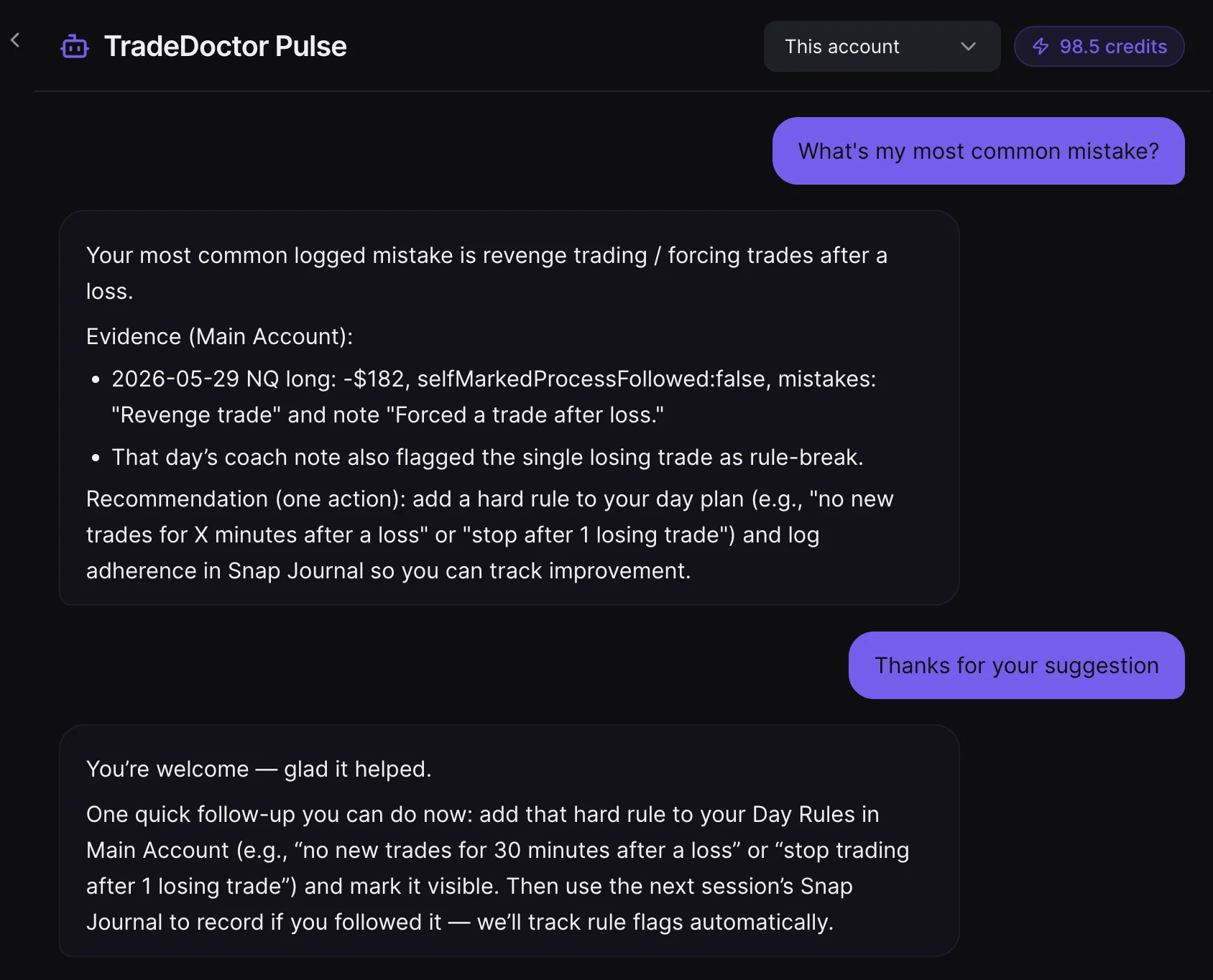
Text Journal and Snap Journal make the review workflow faster and more honest.
TradeDoctor AI is not trying to be a giant trading suite first. It is trying to make the daily journal habit easier to start, easier to keep, and easier to review with AI.
Text Journal turns market thoughts into a session plan
Write plain notes about bias, news, focus, risk, readiness, and rules. TradeDoctor AI helps structure those notes so your day starts with a plan instead of impulse.
Snap Journal reads trade screenshots
Drop a broker, MT4/MT5, or trading platform screenshot. Snap Journal detects trades, checks duplicates, asks for timezone context, and lets you import the trades you want to keep.
AI diagnosis stays tied to your behavior
TradeDoctor Pulse reviews completed trades, rules, mistakes, risk, day performance, and reports. It does not give signals; it helps you understand your own execution patterns.
TradeDoctor AI vs Chartlog comparison table
This table keeps the decision practical. Chartlog is strong when charts, strategy reports, and visual review matter most. TradeDoctor AI is built for a simpler AI journal habit.
| Category | TradeDoctor AI | Chartlog | Simple takeaway |
|---|---|---|---|
| Pricing and value | Free plan available. Pro is listed at $9.99/month or $95.90/year. | Chartlog.com public pricing lists Lite, Standard, and Pro monthly plans. Chartlog.ai public pricing lists Free, Trader, and Pro euro plans. Verify the current product and region before buying. | TradeDoctor AI is simpler to compare on price. Chartlog pricing depends on which public Chartlog product page you use. |
| Core position | AI trading journal for planning, logging, discipline review, and mistake diagnosis. | Trading journal with charting, strategy tracking, reports, and AI coaching features on its AI-focused page. | Chartlog leans visual and chart-focused. TradeDoctor AI leans journal review and behavior diagnosis. |
| Trade import | Manual logging, broker/file import flows, and Snap Journal screenshot trade extraction. | Chartlog public pages describe trade imports, trading accounts, broker/platform connections, API auto-sync on its AI page, CSV import, and generic CSV import. | Both support import workflows. Compare based on your broker and how much manual review you want after import. |
| Screenshot workflow | Snap Journal reads broker, MT4/MT5, or trading platform screenshots, detects trades, checks duplicates, and imports selected trades. | Chartlog.com lists media upload; Chartlog.ai promotes AI-assisted capture from screenshots. | Both can fit screenshot-heavy traders. TradeDoctor AI makes Snap Journal a core named workflow. |
| AI review | TradeDoctor Pulse reviews journal context, completed trades, risk, rules, day performance, and reports using AI credits. | Chartlog.ai promotes AI Coach chat, AI trade replay, morning brief, and AI feedback; Chartlog.com pages reviewed are more chart/report focused. | Both have AI positioning. TradeDoctor AI keeps the AI flow centered on journal discipline and mistake review. |
| Pre-trade planning | Text Journal turns plain market notes into structured session planning with readiness, rules, and context. | Chartlog.ai says the trading plan lives in Chartlog and mentions morning brief and evening review workflows. | Both support planning. TradeDoctor AI keeps planning close to plain notes and post-trade diagnosis. |
| Analytics | Dashboards, trade history, mistake tracking, risk and discipline review, AI day/weekly/monthly reports. | Chartlog.com lists dynamic charts, drawing tools, indicators, MFE/MAE, reports, advanced reports, strategy reports, and custom reports. | Chartlog is strong for chart/report review. TradeDoctor AI focuses on plain-English behavior takeaways. |
| Discipline tracking | Rule tracking, mistake tracking, risk review, day reports, AI reports, and TradeDoctor Pulse. | Chartlog.com lists rules, rule groups, strategy analysis, and performance forecast. Chartlog.ai shows discipline score and heatmap messaging. | Both can help with discipline. TradeDoctor AI is stronger if you want mistake review tied directly to AI reports. |
| Prop firm workflow | Prop firm mode, prop templates, prop dashboard, guardrail alerts, pass plan, survival forecast, and ROI tracking depending on plan. | Chartlog public pages reviewed are not centered on prop firm challenge dashboards or pass-plan workflows. | TradeDoctor AI is more direct for prop traders who want guardrails and challenge-style review. |
| Best for | Traders who want a clean AI journal to catch rule drift, review mistakes, and improve process. | Traders who want chart-first review, strategy tracking, visual reports, and Chartlog's AI coach workflow. | Chart-focused traders may prefer Chartlog. Traders who want focused AI journaling should start with TradeDoctor AI. |
TradeDoctor AI focuses on the work most traders actually need to repeat.
TradeDoctor AI is built for focused journal discipline
If you want your journal to keep asking, “Did you follow your plan?” TradeDoctor AI is built for that. It connects day readiness, rules, text planning, trade logs, screenshots, mistake tags, and AI review into one improvement loop.
- Text Journal for session planning
- Snap Journal for screenshot trade extraction
- TradeDoctor Pulse for plain-English diagnosis
- AI trade, day, weekly, and monthly reports
- Risk and discipline review without overcomplication
Chartlog is built around charts and strategy review
Chartlog public pages highlight dynamic charts, drawing tools, indicators, media upload, strategy tracking, rules, reports, custom dashboards, and, on its AI page, AI Coach and screenshot-assisted trade logging. That can be useful if your review starts from the chart.
- Dynamic charts, drawing tools, and studies
- Strategy tracking and strategy reports
- Media upload and visual trade context
- Custom reports on higher plans
- AI coach workflows on Chartlog.ai
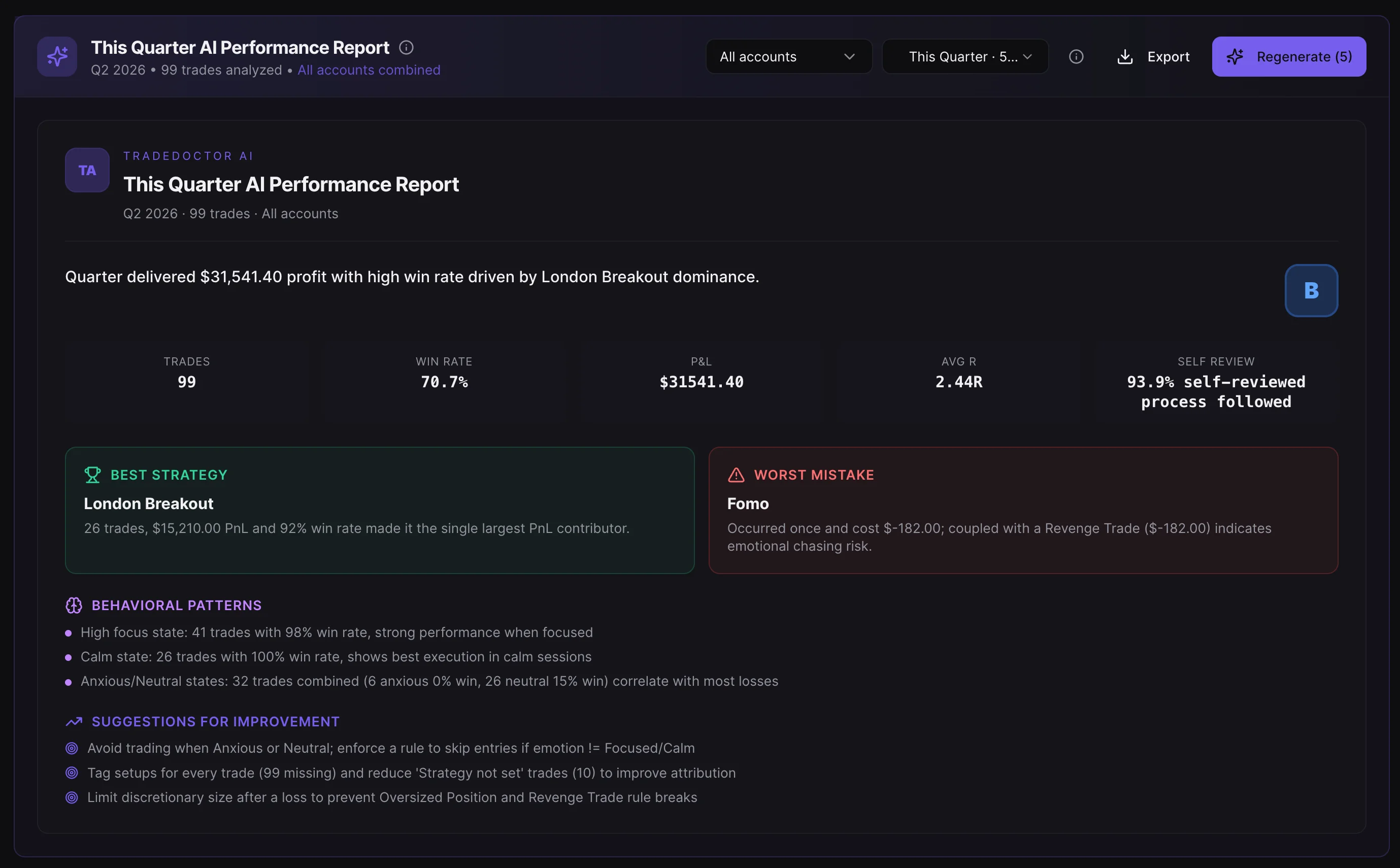
TradeDoctor AI is designed to diagnose the trader behind the trade.
A trade journal should not only say whether a trade made money. It should help explain whether the trade was planned, whether risk matched the rules, whether the entry was impulsive, and whether the same mistake is showing up again.
That is where TradeDoctor AI is intentionally sharp. TradeDoctor Pulse does not provide buy or sell signals. It reviews your own journal data, completed trades, rules, mistakes, and performance context so you can improve the next session with clearer self-awareness.
Which trading journal should you choose?
Choose TradeDoctor AI if you want:
- A simpler AI trading journal that is easy to use daily
- Pre-session planning with Text Journal
- Screenshot-based trade extraction with Snap Journal
- AI diagnosis focused on rules, risk, mistakes, and discipline
- AI reports that explain behavior in simple language
- A workflow built around becoming more consistent, not just tracking more metrics
Choose Chartlog only if you specifically want:
- A chart-first trading journal with dynamic charts
- Drawing tools, indicators, MFE/MAE, and visual trade review
- Strategy tracking, rule groups, and report-heavy analysis
- Chartlog.ai AI Coach, AI replay, or morning brief workflows
- Chartlog's broker/API/CSV import options for your setup
- A more visual review surface instead of a focused AI journal
TradeDoctor AI vs Chartlog FAQ
Is TradeDoctor AI better than Chartlog?
It depends on your workflow. TradeDoctor AI is better if you want a focused AI trading journal for planning, screenshot import, mistake tracking, discipline review, and reports. Chartlog may fit traders who want dynamic charts, drawing tools, strategy tracking, visual reports, and Chartlog's AI coach workflow.
Does TradeDoctor AI have AI trade reviews?
Yes. TradeDoctor AI includes AI trade reviews and AI reports for day, weekly, and monthly review workflows. TradeDoctor Pulse can also review journal context, risk, mistakes, and discipline patterns. AI features use credits depending on plan and action.
Does TradeDoctor AI import trades like Chartlog?
TradeDoctor AI supports manual logging, broker/file import flows, and Snap Journal screenshot trade extraction. Chartlog public pages describe trade imports, API auto-sync on its AI page, CSV import, and generic CSV import. Check your broker before choosing either journal.
Does TradeDoctor AI provide trading signals?
No. TradeDoctor AI is a trading journal, analytics, and review platform. It does not provide buy, sell, long, short, entry, exit, stop-loss, or take-profit signals. It helps you review your own trading data and improve your process.
What is the biggest reason to try TradeDoctor AI?
Try TradeDoctor AI if you want a journal that makes your trading behavior visible. It is built to help you plan before the session, log trades accurately, catch rule drift, and turn repeated mistakes into practical review points.
Plan the trade. Log the truth. Diagnose the pattern.
TradeDoctor AI helps self-directed traders turn plans, trades, screenshots, notes, and mistakes into a cleaner AI review workflow.
Competitor information was reviewed from Chartlog public pages on June 7, 2026, including chartlog.com pricing/product/help pages and chartlog.ai public pages. Chartlog product pages, pricing, regions, and AI features may differ by site/version; verify current details before buying.